Reviewed September 23, 2026. SE Ranking pricing (checked against public cards): Core $129/mo, Growth $279/mo, Enterprise custom. Annual billing saves about 20%. Trial: 14 days, no card.
Choosing an SE Ranking subscription starts with the workload you need to cover: websites, tracked keywords, audit volume, and people using the account. This guide compares the current plans and explains how to budget for extras without mixing legacy subscriptions with today’s offers.
Some links on BoostPlanner are affiliate links. If you make a purchase, I may earn a small commission at no additional cost to you. This helps keep the site running.
Pricing checked September 17, 2026. Prices below are in US dollars. Annual figures are monthly equivalents paid on an annual billing cycle; they are not month-to-month offers. See the official pricing page for your currency, applicable taxes, and the final quote.
If you want to test your workflow first, use the SE Ranking trial. For hands-on context, read the SE Ranking review or our SE Ranking vs Semrush comparison.
SE Ranking Pricing Plans: Subscription Tiers Explained (2026)
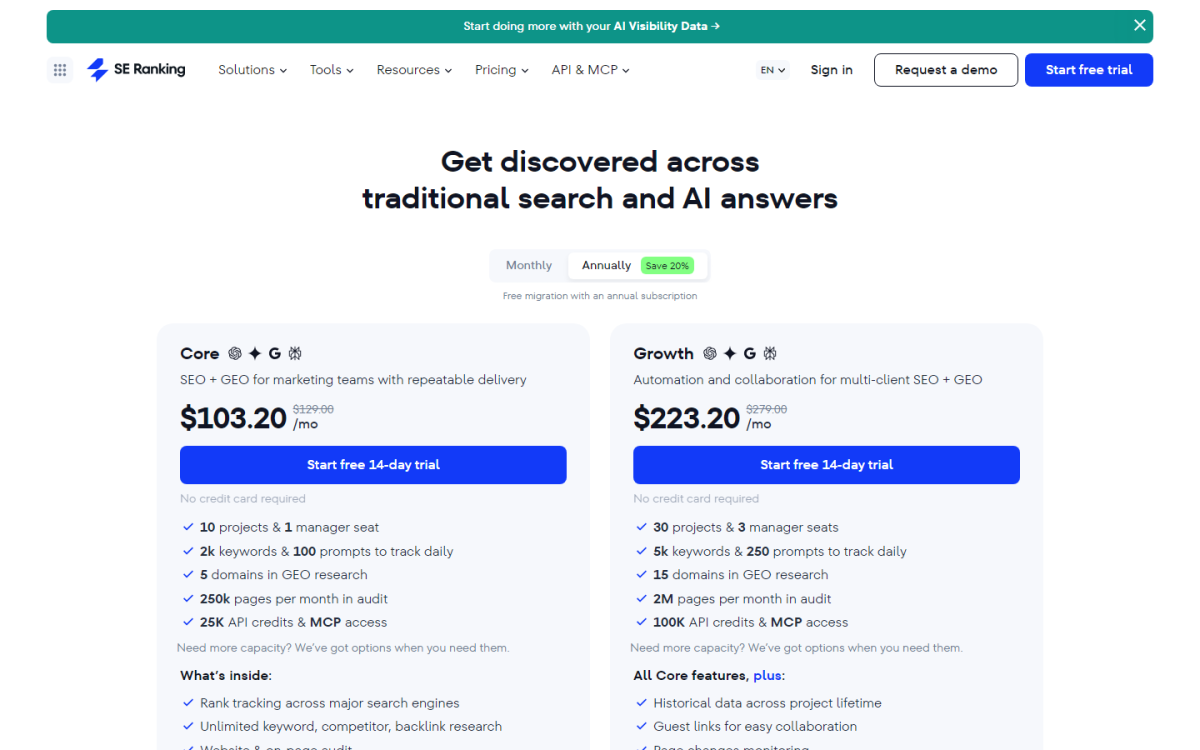
The table gives you a starting point for comparing capacity. Allow room for growth, but avoid paying for a larger package solely because it has more features.
| Plan | Monthly billing | Annual billing: monthly equivalent |
|---|---|---|
| Core | $129 | $103.20 |
| Growth | $279 | $223.20 |
| Enterprise | Custom quote | Custom quote |
| Included capacity | Core | Growth |
|---|---|---|
| Projects / manager seats | 10 / 1 | 30 / 3 |
| Keywords tracked daily | 2,000 | 5,000 |
| Audit pages per month | 250,000 | 2,000,000 |
| Maximum audit pages per project | 250,000 | 1,000,000 |
| Monthly API credits | 25,000 | 100,000 |
Both plans list Looker Studio, Google Analytics, Google Search Console, Matomo, and MCP access. Enterprise limits and terms are negotiated.
Core: start with your actual workload
Core is the first plan I would evaluate when your sites and reporting needs fit within its allowances. Write down how many projects you will actively maintain and how many keywords need tracking. Then check whether your recurring audits and research fit the same subscription.
Do not assume an entry plan excludes reporting integrations or API access. Equally, an included allowance should not be treated as unlimited capacity for custom automation.
Growth: evaluate the extra capacity
Growth deserves a closer look when several people manage a client portfolio or your planned usage exceeds Core. Compare the additional subscription cost with your expected workload and any extras you would otherwise purchase. An agency label alone is not a reason to upgrade.
Enterprise: define the requirements before requesting a quote
Prepare a short requirements list covering users, projects, audit sizes, reporting, integrations, and support. Ask for a written breakdown that makes it possible to compare the proposed package with your existing setup. Avoid treating “custom” as a promise of unlimited usage.
Optional Add-Ons and Additional Costs
Budget for the base subscription and the extras your workflow actually needs. Check the selected billing term and allowance for each item: a headline starting price may describe a different package from the one you need.
Content Marketing
SE Ranking’s content tools support article preparation, writing, and optimization. Before buying extra capacity, check the content allowance already listed for your chosen plan and compare it with the number of articles you expect to work on. Review the Content Marketing platform for the current package details.
Local Marketing
For location-based campaigns, review the Local Marketing options. Consider how many locations you manage, which listing and review workflows you need, and the tracking coverage required. Confirm included usage before adding locations or a separate package.
AI Search
Distinguish the AI capabilities in your base plan from the optional AI Search package. The latter includes visibility research and tracking across supported AI platforms and access to SE Visible. Confirm the engines, prompt allowance, and billing term in the current AI Search offering before purchasing.
Agency Pack
The Agency Pack starts at $69 per month with annual billing. It adds white-label and client-facing features, including branded reporting, client access, and lead-generation tools. Confirm the client-seat allowance in your selected quote rather than relying on old Pro or Business plan labels.
API usage and standalone access
Included API credits, extra API capacity, and a standalone API subscription are different purchases. SE Ranking offers pay-as-you-go and subscription options on its API pricing page. Check the credit cost of the endpoints you will use and the allowance’s renewal period before estimating your costs.
For example, list your planned keyword lookups, domain reports, and audits, then calculate usage using the vendor’s current credit rules. A small reporting workflow and a bulk research pipeline can have very different requirements.
My Experience Using SE Ranking for SEO Clients and BoostPlanner
I’ve been using SE Ranking for about five years across SEO campaigns in the mental health space and for growing BoostPlanner itself. Its pricing flexibility and steady feature expansion make it especially strong for local SEO, content-driven growth, and multi-client management.
For therapy practices, the Local Marketing tools (Map Rank Tracker, GBP management, review monitoring) are particularly effective for improving local pack visibility. Tracking rankings by zip code and device has consistently helped refine geo-targeted strategies.
On the content side, SE Ranking handles keyword tracking, site audits, and content refresh workflows well. The Content Marketing add-on speeds up optimization across large blog libraries without feeling bloated.
In my earlier workflow (on a prior plan name), Looker Studio integration helped keep reporting clean, and API access allowed us to pipe SEO data into internal systems for task tracking and performance reviews. For a new subscription, compare the current Core and Growth allowances above.
Across both client work and BoostPlanner, SE Ranking continues to deliver a strong balance of automation, clarity, and affordability in 2026.
How to Compare SE Ranking With Other Tools
Compare the full cost of your required workflow rather than declaring one platform cheaper in every situation. Match billing periods, users, tracking frequency, usage limits, and add-ons. Check the exact subscription you would buy from each vendor.
| Option | Questions to answer before buying |
|---|---|
| SE Ranking | Does the selected plan cover your workload without extra capacity or add-ons? |
| Semrush | Which subscription and extras cover the same list of requirements? |
| Ahrefs | What would your expected users, research volume, and tracking requirements cost? |
| Moz Pro | Does the selected package cover your locations, campaigns, and reporting needs? |
Use our SE Ranking vs Semrush guide for comparison context, then check Semrush’s current offer alongside the SE Ranking quote. Make the final decision from the features you will use, not a starting-price comparison alone.
Can You Try SE Ranking for Free?
SE Ranking advertises a 14-day trial with no credit card required. Our free-trial guide provides additional context. Use the trial to run a representative task before committing.
Try one real project: add the keywords you care about, run an audit, build a report, and check whether the output supports your decisions. Note anything that requires a different plan or additional purchase.
Frequently Asked Questions About SE Ranking Pricing
How much does SE Ranking cost?
Core is $129/month and Growth is $279/month with monthly billing. The annual monthly equivalents are $103.20 and $223.20. Enterprise is quoted separately. Your total can increase with extras.
What happened to Essential, Pro, and Business?
Those are legacy plan names. This guide compares the current Core, Growth, and Enterprise offers for a new purchase. Existing customers should check their account’s own renewal terms and allowances before switching.
Is SE Ranking always cheaper than Semrush or Ahrefs?
Do not assume so. Compare the subscriptions and extras that cover your actual workload, using the same billing period. A package that looks inexpensive at first may cost more once you add the capacity you need.
Which plan should an agency choose?
Start with your project, user, and reporting requirements. Compare Core with Growth, then add any client-facing features you need to the calculation. Choose Enterprise only when a custom quote better addresses your requirements.
Plan picker
- Core: up to 10 projects, 2,000 keywords/day, 250k audit pages/mo on current cards.
- Growth: up to 30 projects, 5,000 keywords/day, 2M audit pages, historical data, guest links.
- Add-ons: Agency Pack, AI Search, and API modules are not assumed on every seat.
- Always re-check official subscription before purchase.
Which SE Ranking plan fits you?
Choose the smallest package that comfortably covers the work you intend to do. Use the 14-day free trial (no credit card; starter limits) to identify gaps, price any extras, and compare that total with alternatives. Revisit the plan when your workload changes.
- Choose Core if one seat, ~10 projects, and up to 2,000 keywords tracked daily covers your sites – monthly $129, or about $103.20/month billed annually.
- Choose Growth if you need more seats/projects, 5,000 keywords/day, larger audits, guest links, or lifetime historical data – monthly $279, or about $223.20/month annually annually.
- Talk to sales (Enterprise) only when you need custom limits or procurement terms Core/Growth cannot meet.